Getting Started with Spinner Evolution
Install, launch, upgrade, and set a first-hour plan that actually extends your distance.
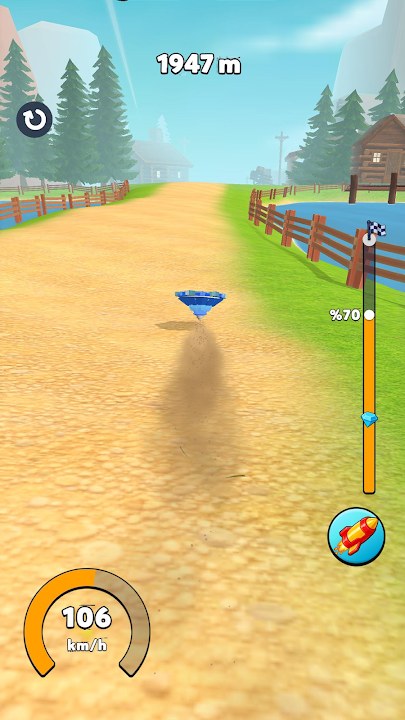
Spinner Evolution is a HyperMonk Games mobile arcade racer built around one loop: aim a spinner, release on timing, smash obstacles, collect coins, upgrade stats, evolve forms, and beat your best distance. This guide covers the first hour on Android, iOS, or Windows (Play Games) so you spend currency on the right problem instead of random taps.
If you only want the short path: finish the tutorial cleanly, bank a few Farm runs, raise Launch Power until starts feel snappy, then Speed, then Durability when obstacles start killing momentum. Keep gems for meaningful jumps. For deeper control timing see Controls. For forms and unlocks see How to Evolve. Spend planning lives on the Upgrade Planner. Meta ranks sit on the Tier List. Promo rewards, when live, are on Codes.
Install and first boot
Download Spinner Evolution from Google Play, the App Store, or Windows Play Games. The game contains ads and optional in-app purchases. After install, grant storage or media permissions only if prompted for saves or media. Launch once on a stable connection so any first-time asset packs finish before you grind offline.
On first open you meet a basic spinner and a short tutorial that teaches aim and release. Treat that tutorial as practice, not a throwaway. The same release window you learn here carries into Farm and every later stage. If the intro feels too fast, exit and re-enter until the timing click is muscle memory.
Tutorial goals that actually matter
The tutorial teaches three habits worth keeping:
- Aim with intent. Point into open ground when you can. Early Farm is forgiving, but bad aim still wastes launch power.
- Release on the power peak. Holding too long or flicking early both soft-start the run. Watch the charge cue until release feels repeatable.
- Keep moving forward. Coins matter, but dying for a side pickup that kills speed is a bad trade on day one.
After the tutorial, play three to five calm Farm runs without upgrading. Note what ends each attempt: weak start, fading mid-run speed, or an obstacle that stops you cold. That note becomes your first upgrade rule.
First-hour upgrade order
Currency comes as coins from runs and rarer gems (often shown as diamonds). Coins are the daily fuel. Gems are the scarce resource—do not blow them on tiny bumps.
Hour-one priority
- Launch Power first if your spinner crawls out of the gate. A stronger open multiplies every other stat.
- Speed second once starts feel solid. Speed turns a clean launch into real distance and better smash force.
- Durability third when crates, fences, or terrain repeatedly end otherwise good runs.
- Overall / broad performance only when the three core stats are close and you need a general bump.
Avoid spreading one coin pile across every button. Two meaningful levels in your limiting stat beat five scattered +1s. When a run fails, ask what failed—then spend. The Upgrade Planner expands this into stage checklists; the upgrade stats tier list ranks each stat by situation.
Energy, ads, and session rhythm
Like many free arcade titles, Spinner Evolution paces attempts with energy or short cooldowns and offers rewarded ads for extra runs, coin boosts, or continue-style perks. Use ads when they remove a real bottleneck (another attempt after a strong upgrade, a double reward after a personal best). Skip ads that interrupt focus if you are practicing launch timing.
Healthy first-hour rhythm:
- Two or three focused launches.
- Upgrade the one stat that ended those runs.
- Optional rewarded ad only if it funds the next meaningful upgrade or attempt.
- Short break before timing gets sloppy.
Gems from IAP packs or rare drops are best saved for evolution gates, large upgrade gaps, or permanent quality-of-life like No Ads if you play daily. There is no need to buy on day one; the Farm loop teaches the game without spending.
What to do in the first hour (checklist)
Minutes 0–10: Finish tutorial. Log three Farm runs. Write down your fail reason each time.
Minutes 10–25: Spend coins into Launch Power until openings feel consistent. Re-run Farm and compare distance.
Minutes 25–40: Add Speed. Practice collecting coins on the main line without steering into soft stops. Read Controls if releases still feel random.
Minutes 40–55: Add Durability only if smash failures dominate. Otherwise keep Speed/Launch balanced. Peek at How to Evolve so you know what an evolution unlock costs and what persists.
Minutes 55–60: One best-effort personal-best attempt. Bank leftover coins toward the next clear upgrade. Skim Codes for any live redeemables, then stop while timing is still sharp.
Early goals beyond raw distance
Distance is the scoreboard, but early progress also means learning Farm obstacle rhythm, unlocking the next environment when the gate opens, and keeping gem stock for evolution rather than impulse buys. New stages (Jungle, Beach, Toy, Space, Snow) change obstacle density and terrain feel—prep tips live in Unlock Levels. Do not rush a new biome under-upgraded; one focused Farm farming session often unlocks cleaner clears later.
Common day-one mistakes
- Upgrading every available button after every run.
- Ignoring launch timing because “stats will fix it.”
- Spending gems on micro upgrades before an evolution or large gap.
- Watching every ad until sessions feel exhausting.
- Chasing a record on a spinner that clearly lacks Durability for the current obstacle wall.
Fix those and the first hour turns into a setup for steady Jungle and Beach progress instead of a coin sink.
Where to go next
Master the touch release window in Controls, stay free-to-play with the F2P Guide, map form unlocks in How to Evolve, push farther with Distance Records, prep late biomes with Space & Snow Tips, play on Windows via Play on PC, plan spends with the Upgrade Planner, and check the Tier List when you are unsure which stat deserves the next coin stack.
Frequently Asked Questions
Quick answers to the most common Spinner Evolution questions.
What should I upgrade first in Spinner Evolution?
Raise Launch Power until starts feel consistent, then Speed for distance and smash force, then Durability when obstacles repeatedly end otherwise good runs.
Should I spend gems on day one?
Usually no. Save gems for evolution unlocks, large upgrade gaps, or quality-of-life like No Ads if you play every day. Coins cover early Farm progress.
Are rewarded ads worth watching?
Yes when they fund another attempt after a real upgrade or double a strong run. Skip them when you are still learning launch timing and need clean practice.
What platforms can I play on?
Spinner Evolution is available on Android and iOS, and can also be played on Windows via Play Games. Controls stay aim-and-release across platforms.
How long should my first session be?
About an hour is enough to finish the tutorial, learn Farm fails, and set a Launch Power then Speed foundation without burning out on ads.